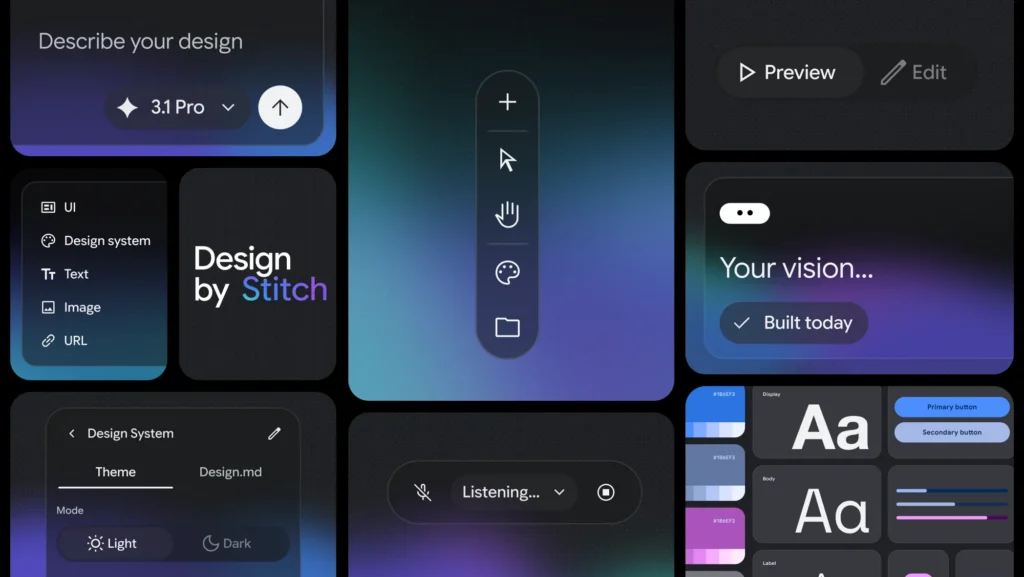
Google recently announced a major update to its experimental design tool, Stitch. If you haven’t heard of it before, Stitch is an AI-powered interface design tool—but this update signals something bigger than just new features.
Google is now describing Stitch as an “AI-native software design canvas”—a space where users can move from an idea to a high-fidelity interface using natural language, images, or even voice.
That shift in language matters.
What’s Actually New in This Update?
Stitch isn’t new, but this version pushes it in a different direction. A few highlights stand out.
First, Stitch is no longer framed as a traditional design tool. Instead of starting with wireframes or components, users are encouraged to begin with intent—what they want to build, how it should feel, and what it should accomplish. In practice, that means you can describe a goal and generate a working interface almost immediately.
Second, Google introduces the idea of “vibe design.” While the phrasing might feel a little buzzword-heavy, the concept is straightforward. Rather than trying to get a design right on the first attempt, users can explore multiple directions quickly and refine toward a stronger result.
Third, the updated Stitch includes a design agent that works alongside the user. This agent can reason across the entire project, suggest changes, and help explore different directions simultaneously. It shifts the process from step-by-step construction to something closer to collaboration.
Another notable addition is the introduction of DESIGN.md, an agent-friendly markdown file that captures design rules and structure. This makes it easier to move designs into other tools or continue development with AI systems without starting over.
Finally, Stitch now supports instant prototyping of user flows. Instead of static screens, users can connect interfaces and immediately experience how someone would move through the app. That ability to test ideas quickly changes the pace of iteration.
Why This Matters for Educators
At first glance, this might seem like a tool built for designers or developers. But the implications for classrooms are more immediate than they appear.
For years, we’ve asked students to design solutions to problems—create a product, propose an innovation, build something meaningful—but those ideas often remain abstract. They exist in slides, posters, or written descriptions.
Tools like Stitch begin to close that gap.
Students can take an idea—such as a tool to help track progress in Algebra 1—and generate a working interface in minutes. From there, they can evaluate it, revise it, and improve it. The work becomes more tangible, and the feedback loop becomes faster.
That shift from describing an idea to interacting with it has real potential to deepen thinking.
The Bigger Shift Underneath
What Stitch represents is part of a broader change in how creation works.
The more technical aspects of building—layout, structure, and basic interaction design—are increasingly handled by AI. That doesn’t eliminate the need for skill, but it does change where the most important thinking happens.
Instead of focusing primarily on execution, the emphasis shifts toward clearly defining problems, making intentional design decisions, and evaluating whether something is actually useful.
Those are the kinds of capacities we want students to develop, but they’re often overshadowed by the mechanics of building something from scratch.
A Quick Reality Check
This doesn’t automatically lead to better learning.
If we simply replace “make a slideshow” with “generate an app,” we haven’t meaningfully changed the task. The tool itself isn’t the innovation. The thinking behind how it’s used is what matters.
Used thoughtfully, however, tools like Stitch can support faster iteration, more visible thinking, and more authentic design work.
Try This in Your Classroom
If you’re curious about what this might look like in practice, you don’t need a full unit redesign to get started. A simple activity can open the door.
Start with a question tied to your content:
- “What would a tool that helps students master this unit actually look like?”
- “How could we design something that makes feedback more useful?”
- “What would help someone learn this concept more effectively?”
Have students work individually or in small groups to:
- Define the purpose of their tool
- Describe the user (another student, themselves, a teacher)
- Generate a design using Stitch or another AI interface tool
- Review the result and critique it
Then push their thinking:
- What works about this design?
- What doesn’t?
- What would you change to make it more useful?
- How does it connect to what we know about learning?
The goal isn’t to build a perfect product. It’s to move students into a cycle of idea → prototype → critique → revision, which is where deeper learning tends to happen.
Final Thought
Google describes this update as helping users “close the gap from idea to reality in minutes rather than days.”
That may sound ambitious, but it reflects a real trend.
As that gap continues to shrink, the question for educators isn’t whether students can build things. It’s what we ask them to build—and whether those tasks are worthy of the tools now available to them.
The Eclectic Educator is a free resource for everyone passionate about education and creativity. If you enjoy the content and want to support the newsletter, consider becoming a paid subscriber. Your support helps keep the insights and inspiration coming!