The Problem with The Anxious Generation — and What the “Ban All Screens” Movement Gets Wrong About Education

There is a real crisis in children’s mental health. I believe this because I see it daily in the schools I work in. The data supports it. The children themselves are telling us. On this point, Jonathan Haidt and I agree completely.

Where I part ways — and where I think the current panic about technology in schools is leading us somewhere counterproductive — is on the question of cause. And because cause determines response, getting this wrong has real consequences for real kids.

Let me be direct: The Anxious Generation is a compelling, well-written, emotionally resonant book built on a scientific case that is significantly weaker than Haidt presents it. The conclusions it has inspired in education policy are, in many cases, the wrong conclusions drawn from the wrong diagnosis — and I think educators and parents deserve a more honest accounting of where the evidence actually stands.


What Haidt Gets Right

Before the criticism, the credit.

Haidt is correct that something has gone badly wrong with childhood and adolescent wellbeing. He’s correct that overprotective parenting and the decline of play-based, independent childhood are serious problems. His advocacy for letting children take risks, experience failure, and develop resilience outside adult supervision — what he calls “antifragile” development — aligns closely with Peter Gray’s research and with what I see as an instructional coach working with students every day.

He’s also correct that smartphones and social media are not neutral tools for developing adolescents. The attention-capture dynamics, the social comparison mechanisms, the algorithmic amplification of outrage and anxiety — these are real design features with real effects. None of that is made up.

The problem is what he does with these legitimate observations. He builds an enormous causal argument on a foundation that the researchers who actually study this area largely reject.


The Scientific Case Against the Thesis

Candice Odgers, a developmental psychologist at UC Irvine, put it plainly in a review published in Nature: “The book’s repeated suggestion that digital technologies are rewiring our children’s brains and causing an epidemic of mental illness is not supported by science.” She added that the “bold proposal that social media is to blame might distract us from effectively responding to the real causes of the current mental-health crisis in young people.”

This isn’t one dissenting voice. The critics are numerous and credentialed. Andrew Przybylski, a professor of human behavior and technology at Oxford, describes Haidt’s approach as “vote counting” — prioritizing quantity of studies over quality, accumulating a long list of weak evidence and presenting it as a compelling case. Christopher Ferguson, a psychology professor at Stetson University who has studied media effects for decades, has pointed out that older adults in the US have experienced worse mental health deterioration than teenagers — which raises an obvious question: why would social media, used most heavily by the young, be causing problems worst in those who use it least?

One critical review examined the actual statistical rigor of the key studies Haidt relies on and found them wanting: “The book is over 400 pages long and waxes lyrical about the spiritual degradation we sustain as a result of social media… I would not have the nerve to write a several hundred page book calling for significant government intervention while summoning only five pages of statistical evidence. To make matters worse, the evidence is weak. The data quality is poor, the studies are flawed, and researchers are divided.”

The studies themselves have serious methodological problems. Many don’t study actual depressed teenage girls or heavy social media users — they study mostly adults, mostly average users, without serious psychological issues. You cannot establish the effect of heavy social media use on teenage depression unless you actually study heavy social media users who are depressed. Most of the studies Haidt cites don’t come close to that standard.


The Pattern I Keep Seeing

I grew up in the 80s and 90s. My generation was going to be ruined by television and video games. We were rotting our brains, becoming socially isolated, losing the capacity for deep attention and real connection. Parents panicked. Legislators proposed restrictions. Books were written explaining the neurological catastrophe underway.

Before my generation, it was comic books. Before that, rock music. Before that — and this is the one I find most useful to remember — novels. In the 18th and 19th centuries, novels were genuinely considered a moral hazard for young people, particularly young women. The idea that you would sit alone for hours, absorbed in a fictional world, engaging your imagination in ways that couldn’t be supervised or directed — this was seen as dangerous. Corrupting. The kind of thing that led to hysteria and bad decisions.

Every generation has a technological panic. The technology changes. The structure of the panic doesn’t. And the panic is always most persuasive to the people who didn’t grow up with the thing being panicked about. Ferguson draws a direct comparison to Seduction of the Innocent, the 1954 bestseller by psychiatrist Fredric Wertham that declared comic books had created a wave of juvenile delinquency — a book that caused enormous policy consequences before the evidence caught up with the panic.

I’m not saying social media is fine. I’m saying we’ve been here before, and the track record of these panics — as predictors of actual causal harm — is not good. The TV and video game generation didn’t turn out markedly worse than the generations before it. The novel-reading generation produced the Enlightenment.

What changes in each iteration is which thing we’ve decided is uniquely, irreversibly corrupting the youth. What doesn’t change is the confidence with which we assert it, the weakness of the actual evidence, and the policy consequences that follow before the evidence is properly interrogated.


What’s Actually Happening in Schools Right Now

The policy landscape has shifted fast. As of early 2026, some state legislators and witnesses have suggested banning 1:1 device programs in schools entirely, with calls for younger students to return to analog learning with pencil and paper. The Distraction-Free Schools Policy Project developed model legislation that would prohibit all screen technology in grades K-5 and ban school technology using generative AI at every grade level.

Parents across the country are forming networks teaching one another how to opt their children out of school-issued Chromebooks and iPads. One parent in California described pulling her children off school-issued devices as an “analog education” — framing it as a victory.

I understand the impulse. I genuinely do. Screen time management is a real issue. Distraction in the classroom is real. The feeling that technology has gotten away from us and we need to reclaim something is legitimate.

But the leap from “smartphones in pockets during class are a distraction” to “all screens in learning environments are harmful and we should return to pencil and paper” is enormous — and it’s a leap that the evidence doesn’t support.

Easier classroom management is not the same as better learning. And limiting students to pen and paper does little to prepare them for a world in which thinking, writing, and collaboration increasingly happen through digital tools.

There’s also an equity issue that gets papered over in these conversations. The children of affluent parents who are choosing analog education for their kids will still encounter a fully digital professional world. They’ll learn to navigate it eventually — at home, through tutors, through the social capital their families provide. The students who most need schools to close the digital literacy gap are the ones who will lose the most if we strip that from their education.


The Right Diagnosis, the Wrong Villain

Here’s what I think is actually happening, and why Gray’s framework matters more than Haidt’s for understanding it.

The mental health crisis in children is real and has been building since roughly the 1950s — decades before smartphones, social media, or the internet. Gray’s longitudinal data makes this undeniable. The primary driver, in Gray’s reading, is the progressive elimination of children’s independent, unstructured time: the reduction of recess, the increase in adult supervision, the overscheduling of childhood, the cultural shift toward treating independent children as negligent parenting.

Smartphones accelerated some of these dynamics and added new ones. But they arrived into a childhood that was already significantly impoverished of independent developmental experience. Children who have no free time, no unstructured outdoor play, no practice at self-regulation and conflict resolution — those children are developmentally primed for anxiety. Of course they reach for the nearest source of stimulation, connection, and escape. Of course the smartphone fills the vacuum.

The phone is a symptom as much as a cause. Taking the phone without restoring what the phone replaced is treating the symptom.

This is why I find the pencil-and-paper movement in education so frustrating. It’s addressing the wrong variable. A student who sits at a desk for six hours a day, goes home to an overscheduled afternoon of structured activities, and has never had two consecutive hours of genuinely unstructured time is not going to develop resilience because their school gave them a pencil instead of a Chromebook. The problem runs deeper than the device.


What Schools Should Actually Do

This is where I land, after years in the classroom and coaching teachers, watching students, and reading the research:

Cellphones during instructional time are a legitimate problem. Personal smartphones in pockets during class are a distraction issue, not a technology issue. Addressing that specifically — with clear policies, consistently enforced — is reasonable and has some evidence behind it.

1:1 device programs deserve scrutiny, but not abolition. The question isn’t whether devices belong in schools. It’s whether the learning design built around devices is pedagogically sound. The problem was never laptops. The real issue is the learning model we built around laptops. Bad technology implementation is a professional development and curriculum problem, not a technology problem.

The equity argument matters. Any policy that removes digital tools from schools disproportionately disadvantages students whose families can’t provide those tools and experiences at home.

Unstructured time is the real deficit. If we genuinely want to address the root causes of the mental health crisis Gray’s research describes, we need to give children back their unstructured time — at school and at home. More recess. Fewer scheduled activities. More space for boredom, conflict, and self-direction. That’s the intervention the data supports.

Teaching students to use technology critically is education, not capitulation. We live in a world saturated with algorithms designed to capture attention. The answer is not to pretend that world doesn’t exist or to seal children off from it until they turn 16 and then release them into it untrained. The answer is to help students develop the critical capacities to navigate it. That’s what education is for.


A Final Thought on Haidt

I’m not saying don’t read The Anxious Generation. It’s a book worth engaging with, and the parts of it that align with Gray’s research on free play and independent childhood are genuinely valuable. Haidt is a smart person thinking hard about a real problem.

But read it skeptically. Read the critics. Notice how much of the emotional weight of the book rests on anecdote and moral argument rather than the statistical case. Notice that the researchers who spend their careers studying this specific question — screen time and adolescent mental health — largely disagree with his conclusions.

And notice, most importantly, what the book makes it easy to avoid thinking about: the choices adults make about how to structure children’s time, how to design schools, how to build neighborhoods, how to value childhood independence. Those are harder conversations because they implicate us directly. Blaming the phone is easier. It usually is.


Further Reading

Free to Learn by Peter Gray — Start here. Gray’s full argument, written for a general audience, is rooted in decades of evolutionary psychology research. More compelling, better supported, and more actionable than anything else on this list.

Growing Up in Public: Coming of Age in a Digital World by Devorah Heitner — Published in 2023, this is the most current and most practically useful book on kids and technology that I’ve found. Heitner, a former media studies professor with a PhD from Northwestern, explicitly rejects the fear-based framing that dominates this conversation. Her core argument: the answer is mentoring, not monitoring. She draws on hundreds of interviews with kids, parents, and educators rather than extrapolating from weak correlational studies. A direct and well-earned counterweight to Haidt.

The Anxious Generation by Jonathan Haidt — Read it. Engage with the parts that align with Gray’s research on play deprivation. Push back hard on the causal claims about smartphones. It’s worth reading because it’s driving policy — and understanding the argument you’re pushing back against requires having read it.

Reclaiming Conversation by Sherry Turkle — Turkle is an MIT sociologist who has spent decades doing actual long-form qualitative research with students and families about technology and attention. More careful than Haidt, more specific about the mechanisms, and more interested in nuance than in producing a villain. Published in 2016, but holds up.

How Children Learn by John Holt — First published in 1967. Holt sat in classrooms, observed children learning — or not learning — and drew conclusions that the education system has ignored ever since. Gray cites him approvingly. The arguments about how children develop intrinsic motivation, curiosity, and self-direction are as relevant now as they were sixty years ago, possibly more so.


The Eclectic Educator is a free resource for everyone passionate about education and creativity. If you enjoy the content and want to support the newsletter, consider becoming a paid subscriber. Your support helps keep the insights and inspiration coming!
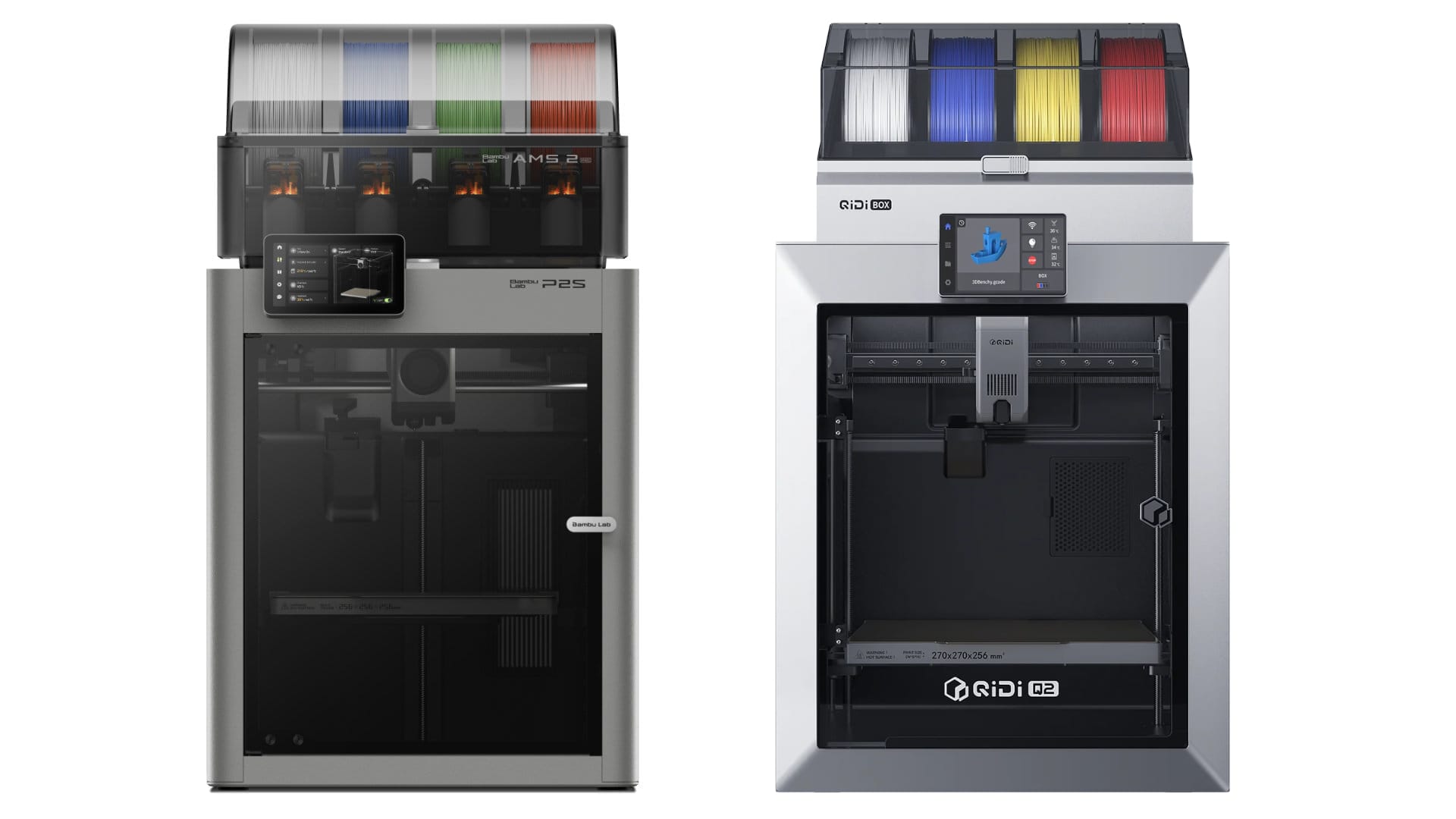

You Can Just Print An Air Purifier

I don’t have the time right now, but when the ol’ dissertation is done, I can easily see a 3D printer getting heavy usage around these parts…

3D printers are one of the few pieces of technology in the last 30 years that are as revolutionary as they were pitched. It is easy to miss that fact, in part because 3D printing itself is a dorky little habit that produces a lot of embarrassing trinkets with visible layer lines, a technology that launched a thousand Iron Man cosplay masks. But the quality and speed of these machines improves yearly, and you can get a fantastic printer that handles multiple colors for less than $600 dollars and even cheaper if you go with eBay or know someone who is moving at just the right time. Access to a 3D printer can be a great way to repair an existing device, replace something you would otherwise buy commercially, or create something that the commercial market would never provide you.

Want to try this yourself? The printer the article is describing is real, and the current best-in-class for an enclosed home machine is the Bambu Lab P2S ($549 direct from Bambu). It’s the evolution of their best-selling P1S — fully enclosed, quieter, faster, AI-powered print monitoring, and built-in filament drying with the AMS 2. It handles engineering-grade filaments that open-frame printers can’t touch, and it sets up in about 15 minutes. Pair it with some HEPA filter material and you’ve got a DIY Corsi-Rosenthal box that actually works. The barrier to entry on serious 3D printing has never been lower.

Source: You Can Just Print An Air Purifier

3d printers

Gifts for the Tech Dad: Father’s Day Finds for Gadget Lovers

father and son sitting on the floor
Photo by Timur Weber on Pexels.com

Let’s face it — some dads don’t want ties or mugs. They want toys with microchips, glowing LEDs, and more ports than a space station.

If your dad is the kind who insists on explaining the difference between USB-C and Thunderbolt (and why it matters), this is the list for you.

These gifts hit the sweet spot between practical and just plain cool — ideal for Father’s Day, birthdays, or whenever you want to reward the man who upgraded the Wi-Fi and taught you how to use Ctrl+Z.


1. Anker Prime Power Bank (20,000 mAh, 200W Fast Charging)

For the dad who never wants to see 1% battery again
This isn’t just a power bank — it’s a portable power arsenal. Whether he’s juggling devices on a road trip or keeping the family gadgets alive during a power outage, this compact beast delivers serious juice.

With 87W of output shared across three devices, it can simultaneously fast-charge an iPhone, a Samsung Galaxy, and even a MacBook. One device can get up to 65W on its own, which is enough to take a 14″ MacBook Pro to 50% in under 40 minutes. And thanks to the built-in USB-C cable (which is rugged enough to survive 10,000+ bends), he won’t have to go digging through his bag for cords.

Need to top it off quickly? A 65W charger will fully refuel the power bank in just 90 minutes. And with a 20,000mAh battery, he can stay unplugged and productive for hours — all while meeting airline travel requirements.

Specs at a glance:

  • Built-in USB-C cable that charges iPhone 15 Pro to 58% in 30 mins
  • MacBook Air hits 52% in the same time
  • 20,000mAh capacity for all-day power
  • Airline-approved for travel
  • Comes with an 18-month warranty and stellar customer support

If your dad is the kind of guy who’d rather run out of gas than battery, this is the upgrade he didn’t know he needed.


2. Ember Temperature Control Smart Mug 2

Because lukewarm coffee is a crime

If your dad is the type who microwaves his coffee three times before finishing it, this one’s a game-changer.

The Ember Mug 2 keeps drinks at the perfect temperature — not just warm, but just right between 120°F and 145°F. It holds heat for up to 80 minutes on its own, or all day when placed on its sleek charging coaster. Whether he’s deep in grading, coding, or falling down a Wikipedia rabbit hole, his coffee or tea will be ready when he is.

What makes this mug especially “dad tech” is the way it balances smart features with everyday ease. He can connect it to the Ember app to set precise temperatures and receive alerts when it hits his preferred level of hotness (135°F is the default if he goes app-free). The mug remembers his last setting too, so once it’s dialed in, it’s hands-off.

With auto-sleep and motion sensors, it wakes up when hot liquid is poured and powers down when not in use. The built-in LED even lets him know when it’s go-time with a glowing temperature-ready signal.

And while it’s techy, it’s still practical — hand-wash safe, scratch-resistant, and water-resistant up to 1 meter (just don’t put it in the dishwasher unless you want to ruin his new favorite gadget).

Why it’s perfect:

  • Keeps drinks hot for 80 minutes (or all day with the coaster)
  • App-connected for temperature control and alerts
  • Auto-sensing sleep/wake features
  • LED light shows when your drink is just right
  • Durable, hand-wash safe, and scratch-resistant

Perfect for the desk, the workshop, or the reading nook — and way more thoughtful than another novelty mug.


3. Meta Quest 3 (128GB)

VR for gaming, fitness, or pretending he’s on the Holodeck

Some dads want socks. Others want to be Batman.

Enter the Meta Quest 3 — the next-gen virtual and mixed reality headset that transforms your living room into whatever world he wants it to be. Whether he’s solving mysteries in Gotham (Batman: Arkham Shadow included with purchase), watching concerts with friends in Meta Horizon, or just kicking back with YouTube on a floating digital screen, this is the ultimate immersive experience.

The Quest 3 isn’t just about play — though there’s plenty of that. It’s built for multitasking, with the ability to pull up multiple screens to browse the web, watch videos, and chat with friends while still being able to see the real world around him. That’s right: mixed reality blends digital objects into his actual space, so he can go from fighting ghosts to answering messages without removing the headset.

Streaming shows? It turns any room into a personal theater with a giant screen, customizable surroundings, and compatibility with USB-C and standard headphones (just bring an adapter). Want to work out without judgment? He can bust a sweat boxing, dancing, or dodging digital projectiles — no gym membership required.

Under the hood:

  • 2X the GPU power of the Quest 2 thanks to the Snapdragon XR2 Gen 2
  • Precision hand tracking or enhanced Touch Plus Controllers
  • Access to apps like WhatsApp, Instagram, and Messenger right inside the headset
  • Wireless freedom and a lightweight build for comfort during extended use
  • Family-friendly with parental controls, usage tracking, and multi-user support (great if you also want to play)

Whether he’s chasing high scores, high reps, or high drama, the Quest 3 lets him do it all in a completely reimagined space.


4. Bird Buddy PRO Solar Smart Bird Feeder with Camera

The ultimate upgrade for dads who birdwatch with binoculars in one hand and a smartphone in the other

Move over squirrel-cams, the Bird Buddy is here — and it’s not your average backyard bird feeder. This AI-powered feeder is perfect for the dad who loves nature and data. It doesn’t just attract feathered friends; it identifies them, logs them, and sends real-time alerts the moment a new visitor drops by for a snack.

The Bird Buddy’s app uses artificial intelligence to recognize bird species, track visits from individual birds, and even detect signs of illness — yes, we’re officially living in the future. Bonus: it can also ID other animal visitors (looking at you, raccoons). The optional premium subscription lets your dad organize a digital scrapbook of his backyard wildlife and share sightings with friends or family. Think Pokémon Snap, but for birders.

With a 5MP camera and 2K video resolution, this feeder captures stunning close-ups of birds in motion, including slow-mo action shots and gorgeous HDR contrasts. It even has a wide-angle lens to make sure no fluff or feathers go undocumented.

Why it’s smart (literally):

  • AI identifies birds (and other critters) by species
  • 2K video, HDR, and slow-motion features
  • Real-time app alerts and educational facts
  • Privacy-first design: focused only on the feeder, not the yard
  • Simple setup: app-guided positioning and Wi-Fi pairing
  • Multiple mounting options: hang it from a branch or mount it to a pole (hanger included, pole not)

If your dad is the kind of guy who narrates backyard bird drama like it’s a nature documentary, this feeder gives him the high-def visuals and intelligent insights to take it to the next level.


5. Twelve South HoverBar Duo 2

For the multitasking dad who wants his iPad to work as hard as he does

Whether he’s watching YouTube tutorials in the kitchen, catching up on email from bed, or using his iPad as a second screen during work meetings, the HoverBar Duo 2 is the flexible, no-fuss tool every tech-loving dad didn’t know he needed.

This stand does it all. It comes with both a weighted desktop base and a shelf clamp, making it wildly versatile — desk setup, kitchen counter, nightstand, workshop bench — wherever he roams, the HoverBar follows. The quick-release clip makes switching between mounting styles refreshingly painless.

The arm is fully adjustable, capable of positioning the iPad up to two feet in the air or tucked low against the base. Combine that with universal compatibility for all iPad models (yes, even the Pro in its chunky case), and you’ve got a true chameleon of tablet stands.

And let’s talk productivity. This isn’t just a glorified iPad holder — it’s a full-blown station upgrade. With iPadOS now supporting Stage Manager, Universal Control, SideCar, and CenterStage, your dad can turn his iPad into a Mac companion, a presentation tool, or the ultimate eye-level video conferencing rig that keeps him centered in the frame — no awkward chin angles here.

Why it stands out (pun intended):

  • Includes desktop base and shelf clamp for flexible setup
  • Height- and angle-adjustable arm puts your iPad right where you need it
  • Quick-release clip makes setup easy and fast
  • Works with all iPad models and most cases
  • Great for dual-screen setups with Mac, or for hands-free use anywhere in the house
  • Optimized for iPad features like CenterStage, SideCar, and Universal Control

If your dad likes his tech practical, modular, and effortlessly cool, this stand delivers on all fronts.


6. Logitech MX Master 3S Mouse

For the dad who believes “ergonomic” is a lifestyle and “multi-screening” is a sport

Some dads collect remote controls. Others master the art of seamlessly working across two computers, a tablet, and their phone, without breaking a sweat. If that sounds like your dad, the MX Master 3S from Logitech is the mouse he deserves.

This isn’t your average point-and-click. With FLOW cross-computer control, your dad can move his cursor between multiple screens (yes, even between Mac and Windows) and drag and drop files like it’s magic. It’s like copy/paste leveled up.

The clicks? Still satisfyingly tactile — just 90% quieter, thanks to Logitech’s new Quiet Clicks tech. So if he’s an early riser or a late-night tinkerer, he won’t disturb the rest of the house while organizing his files or editing photos.

The sensor tracks on virtually any surface — even glass — and the upgraded 8,000 DPI precision means his movements are lightning accurate, whether he’s on a workbench, couch cushion, or the sleek glass desk he swears makes him more productive.

Plus, with the Logi Options+ app, he can customize buttons, create app-specific profiles, and even enable AI Prompt Builder, a new feature designed to optimize prompts across generative AI tools. Yes, we’ve reached that level of geekery.

Why it’s a no-brainer:

  • Works across multiple computers and OSes with FLOW
  • 8K DPI sensor tracks on any surface — even glass
  • Customizable buttons for different apps/workflows
  • New Quiet Clicks tech = nearly silent operation
  • Compatible with Logi AI Prompt Builder via the Options+ app
  • Ergonomically designed for comfort during marathon work sessions

If your dad lives in spreadsheets by day and edits drone footage by night, this mouse is his secret weapon.


7. Raspberry Pi 5 Starter Kit (CanaKit Edition)

For the dad who thinks a fun weekend involves Linux, soldering, and blinking LEDs

Let’s be clear: this isn’t just a gift — it’s a gateway. The Raspberry Pi 5 Starter Kit is perfect for the dad who’s always wanted to build his own server, smart mirror, retro gaming console, or weather station… but just needed the right excuse (and parts) to get started.

This kit is as plug-and-play as Pi projects get. It includes the powerful Raspberry Pi 5 board with a 2.4GHz 64-bit quad-core CPU and a whopping 8GB of RAM, giving him the horsepower to run advanced operating systems, compile code, or spin up containers like a pro. The included 128GB EVO+ microSD card is preloaded with Raspberry Pi OS, so he can boot it up and dive in without downloading a thing.

And this isn’t some bare-board, duct-tape-together setup — the CanaKit Turbine Black Case is sleek and functional, equipped with a low-noise fan and mega heat sink to keep things cool during intense tinkering sessions. Add in a 45W PD power supply and not one but two 6-foot 4K 60p display cables, and your dad will be dual-monitoring his custom Pi dashboard in no time.

What’s in the box:

  • Raspberry Pi 5 with 8GB RAM and quad-core CPU
  • Preloaded 128GB microSD card + USB reader
  • CanaKit Turbine Case + ultra-quiet fan + massive heat sink
  • CanaKit 45W USB-C PD power supply
  • 2x HDMI display cables (supports dual 4K@60Hz)

This is a dream kit for dads who love building things from scratch — whether it’s for fun, for the challenge, or for turning your smart home into a genius home.


Bonus Picks (Because tech dads deserve options)


Wrap-Up: Make It Personal

No matter how shiny the gadget, the best gift is one that shows you get him. Pair one of these with a handwritten note, a memory of him fixing your broken phone (again), or a digital playlist of the best dad jams, and you’re golden.

Happy Father’s Day to the dads who read instruction manuals for fun.

—Mike

A Book About a Breakthrough Technology: 5 Fascinating Picks for Your Reading Challenge

close up of blue paint
Photo by Nikolai Ulltang on Pexels.com

Technology can shape our world, transform industries, and redefine what’s possible. For this prompt in the 2025 Reading Challenge, I’ve selected five compelling books that dive into the stories behind groundbreaking innovations and the people who made them happen. Whether you’re a tech enthusiast or just curious about the forces driving change, these titles will inspire you.


1. The Innovators by Walter Isaacson

Genre: Nonfiction/Biography
Overview: From the creator of the bestselling Steve Jobs, Walter Isaacson explores the history of the digital revolution and the remarkable minds behind it. This riveting tale of collaboration and invention highlights the teamwork driving technological breakthroughs.

Find it on Amazon


2. How to Invent Everything by Ryan North

Genre: Nonfiction/Science
Overview: Imagine being stranded in the past with no modern conveniences. Ryan North’s witty and educational guide is a crash course in humanity’s greatest inventions and how they work. Equal parts entertaining and enlightening, this book is a love letter to technology’s ingenuity.

Find it on Amazon


3. AI 2041: Ten Visions for Our Future by Kai-Fu Lee and Chen Qiufan

Genre: Science Fiction/Nonfiction
Overview: Blending storytelling with real-world expertise, this book presents ten futuristic scenarios shaped by AI. Kai-Fu Lee and Chen Qiufan explore the promises and challenges of artificial intelligence in a format that’s as thought-provoking as it is engaging.

Find it on Amazon


4. Code Breaker by Walter Isaacson

Genre: Biography/Science
Overview: Another gem from Walter Isaacson, this biography of Jennifer Doudna and the discovery of CRISPR technology is a compelling narrative about one of our most significant scientific breakthroughs. It’s a fascinating look at the ethical dilemmas and possibilities of gene editing.

Find it on Amazon


5. Machines Like Me by Ian McEwan

Genre: Science Fiction
Overview: What happens when humans create life-like artificial intelligence? This thought-provoking novel imagines a world where androids blur the line between human and machine, exploring themes of morality, emotion, and the nature of consciousness.

Find it on Amazon


Why These Books Work for the Challenge

These books explore the multifaceted nature of breakthrough technology—from its historical roots to its ethical implications and speculative future. Whether you’re interested in the real stories behind modern advancements or enjoy grappling with big philosophical questions, this list has something for you.

Get Your Free Printables!

Ready to track your reading journey? Sign up for my newsletter to grab your free 2025 Reading Challenge printables, including a tracker and journal pages.

📥 Sign up here to stay inspired and organized!

Let’s celebrate the marvels of technology through the power of storytelling. Happy reading!


The Eclectic Educator is a free resource for everyone passionate about education and creativity. If you enjoy the content and want to support the newsletter, consider becoming a paid subscriber. Your support helps keep the insights and inspiration coming!

Ten books from MIT faculty to expand your knowledge of teaching, learning, and technology

reading

As we head into Spring Break and, soon, into summer, you may already be building your reading list.

I know not everyone is busy marking professional learning books like me (yes, I have a sickness), but if you are, I have some recommendations.

Here are 10 books shared by MIT Open Learning faculty that explore teaching, learning, and technology. The books cover topics such as innovation in manufacturing, creating Android apps, sociable robots, educational technology, the science of learning, and workforce education.

One of my favorites, Failure to Disrupt, is on the list. I believe that text is required reading for anyone in the educational technology space if you’re brave enough to admit that we are often wrong about what technology can do in our schools.


The Eclectic Educator is a free resource for everyone passionate about education and creativity. If you enjoy the content and want to support the newsletter, consider becoming a paid subscriber. Your support helps keep the insights and inspiration coming!

Redefining College & Career Readiness for Students

photo of man and woman talking to each other
Photo by cottonbro studio on Pexels.com

Ask ten teachers what their job is, and you’ll receive ten different answers. However, most of them share the common goal of preparing the next generation of citizens. Yet, educators acknowledge that the world in which students will live and work will radically differ from the current version. Therefore, it is nearly impossible for the education system to prepare students for that future fully.

To address this challenge, educators often discuss the concept of “college and career readiness.” Being “college and career ready” means that students possess the skills to strategically and effectively apply their learning in various situations, enabling their success in both academic and work environments. This readiness extends beyond academic knowledge and encompasses essential skills such as resilience, mental health, and performance, which are crucial for adapting to an ever-changing future.

However, the focus on specific pathways for college and career readiness often stems from traditional educational structures and measures of success. There is a growing awareness that a one-size-fits-all approach may not suit all students, and personalized learning experiences are increasingly valued. It is important to recognize that success in the future will require adaptability and a broad skill set beyond academic knowledge.

To prepare students for an unpredictable future, we must move beyond traditional 20th-century learning practices and cultivate an updated skill set. This includes fostering strong learning and critical thinking skills and developing “human” skills that equip students to navigate an uncertain world. Moreover, it is crucial to view students as change-makers and provide them with opportunities to develop traits such as optimism and resilience. This preparation should involve nurturing creativity, encouraging exploration, and fostering a willingness to take risks. It is essential to equip students with the necessary skills and knowledge to progress steadily towards their goals.

However, it is important to acknowledge that a portion of the student population does not fit into the accepted mold of “college and career readiness” imposed by the system. These are the students who consider themselves artists, creators, inventors, and so on. They do not neatly fit into career pathways or college preparatory tracks, which are currently popular trends in high school education.

Regardless of our efforts, we cannot force these square pegs into round holes, or any other shape for that matter. Instead, we should explore ways for these students to create their own paths.

This is where personalized learning comes into play. Personalized learning is becoming increasingly important as it caters to the unique needs of each student, promoting progress at an individual pace. It empowers students to take greater ownership of their learning journey, leading to deeper learning, increased motivation, and improved relationships and communication skills. The implementation of personalized learning requires a shift from traditional classrooms to learning hubs, from a rigid curriculum to personalized pathways, and from a fixed pace to personalized progressions through cycles of inquiry. Creating personalized learning pathways for teachers and recognizing their competency in specific areas through micro-credentials is also beneficial. Additionally, online platforms can offer a range of activities that align with each student’s unique interests and strengths.

Personalized learning and the concept of graduate profiles contribute to a new perspective on career readiness by focusing on individual student strengths and interests. Personalized learning enables student-driven models in which students engage in meaningful, authentic, and rigorous challenges to showcase desired outcomes. This approach fosters skills like goal setting, time management, and the ability to navigate unpredictable obstacles, all of which are crucial for career readiness.

Graduate profiles outline the skills and competencies that a district or institution aims for its students to possess upon graduation. These profiles serve as a guiding principle for improvement efforts and reflect the collective commitment to equipping students with the skills necessary for personal success and meaningful civic engagement. By embracing personalized learning, graduate profiles, and similar concepts, we can better prepare students for their future careers in a rapidly changing world.

Further Reading:

How to Use Google Drive in the Classroom: A Teacher’s Guide

In today’s digital age, the classroom is no longer confined to four walls. Educators can create a dynamic and collaborative learning environment with tools like Google Drive. This guide focuses on how to use Google Drive in the classroom, offering insights and tips to enhance teaching and learning experiences.

What is Google Drive, and Why Use It in the Classroom?

Google Drive is a cloud-based storage system that allows users to save, share, and collaborate on files. Here’s why it’s a game-changer for educators:

  1. Accessibility: Teachers and students can access files from anywhere, anytime.
  2. Collaboration: Work on documents simultaneously, fostering teamwork and creativity.
  3. Organization: Keep all classroom materials in one place, neatly organized.
  4. Integration: Seamlessly integrate with other Google tools like Docs, Sheets, and Slides.
how to use google drive in the classroom
Photo by Caio on Pexels.com

Getting Started: How to Use Google Drive in the Classroom

Setting Up Google Drive

Access Google Drive by visiting drive.google.com. Teachers can also install Google Drive on their PCs or mobile devices for on-the-go access.

Creating and Organizing Folders

Create folders for different subjects, projects, or students. Customize them with colors for easy identification.

Uploading Teaching Materials

Drag and drop files or use the “New” button to upload lesson plans, presentations, worksheets, etc.

Sharing Resources with Students

Share files or folders with students by generating a link or inviting them via email. Set permissions to control editing or viewing rights.

Collaborative Learning with Google Drive

Collaborative Projects

Assign group projects where students can work together on the same document, encouraging collaboration and critical thinking.

Real-Time Feedback

Provide real-time feedback on students’ work by adding comments directly in the documents.

Classroom Portfolios

Students can create digital portfolios within Google Drive, showcasing their work throughout the year.

Tips for Using Google Drive in the Classroom

  1. Set Clear Guidelines: Teach students how to use Google Drive responsibly and set clear guidelines for collaboration.
  2. Use Templates: Create templates for common assignments to streamline the process.
  3. Explore Add-Ons: Utilize add-ons and extensions that integrate with Google Drive to enhance functionality.
  4. Monitor Collaborations: Keep track of changes and contributions by using the “Version History” feature.

Conclusion: Embrace Digital Learning with Google Drive

How to use Google Drive in the classroom is a question with an exciting array of answers. From fostering collaboration to organizing resources, Google Drive offers a plethora of opportunities to enhance the learning experience.

Teachers can create a more engaging, interactive, and organized learning environment by integrating Google Drive into the classroom. It’s not just about storing files; it’s about creating a dynamic space where education thrives.


The Eclectic Educator is a free resource for everyone passionate about education and creativity. If you enjoy the content and want to support the newsletter, consider becoming a paid subscriber. Your support helps keep the insights and inspiration coming!

Reading Something Wonderful – I Think

a man reading book while sitting on a bed
Photo by Dayan Rodio on Pexels.com

The Internet is home to so much of the world’s written text that it’s difficult to figure out some of the “best” articles.

Of course, “best” is 100% subjective, and your favorite text is likely not mine. However, some works are interesting enough that many have shared them repeatedly.

I’m not speaking of the time-tested classics of literature that you can find for free in ebook or PDF form but of articles that have been produced primarily during the Information Age.

Now, Ben Springwater has built a site that hopes to feature many of these articles in one place.

Or, maybe it’s just a cool way to promote the Matter app, designed for reading web-based content at your leisure. (Personally, I use Readwise for this same function.)

Either way, the site is worth checking out.


The Eclectic Educator is a free resource for everyone passionate about education and creativity. If you enjoy the content and want to support the newsletter, consider becoming a paid subscriber. Your support helps keep the insights and inspiration coming!

Unveiling the Power of Technology in Education: A Comprehensive Guide

photo of people doing handshakes
Photo by fauxels on Pexels.com

The Indispensable Role of Technology in Learning

Today, we’re witnessing a transformative phase in the educational landscape, significantly driven by technology. From creating engaging and immersive learning experiences to empowering educators and students with access to limitless resources, technology plays an indispensable role in modern education.

The progression from traditional chalk-and-board classrooms to interactive digital learning environments is not just a shift in teaching methods. It’s a change that enhances student engagement, collaboration, and personalized learning while opening avenues to global knowledge repositories.

Technological Integration: A Step-By-Step Implementation Guide

For any educational institution planning to embrace technology, it’s crucial to understand the implementation process. This will ensure a smooth transition and maximize the benefits of technology integration.

Step 1: Establish Clear Goals

Begin with a clear vision of what you wish to achieve. Establish the learning outcomes and the ways technology can enhance those. Whether it’s increasing student engagement, encouraging collaboration, or personalizing learning experiences, having clear goals will guide your technological integration.

Step 2: Assess the Infrastructure

Assessing the existing infrastructure is the next critical step. Determine the state of current resources, including hardware, software, and internet connectivity, and identify areas of improvement. This will ensure that the technology integration aligns with the institution’s capabilities.

Step 3: Professional Development for Teachers

Equip teachers with the necessary training to navigate the new technology. Professional development programs ensure teachers are comfortable using the tools, making their teaching more effective.

Step 4: Evaluate and Choose the Right Technology

Research and identify the technologies that align with your goals. Whether it’s learning management systems (LMS), interactive whiteboards, or student response systems, evaluate each based on their utility and compatibility with your institution’s needs.

Step 5: Gradual Integration and Constant Evaluation

Integrate technology gradually into the learning environment and constantly evaluate its effectiveness. This will ensure that the technology enhances the learning experience as intended.

The Impact of Technology on Student Engagement and Collaboration

The integration of technology in education can greatly enhance student engagement. Interactive tools and multimedia content cater to various learning styles, making the learning process more engaging and inclusive.

Additionally, technology fosters collaboration among students. Digital platforms enable students to collaborate in real-time, irrespective of their geographical location. This cultivates a sense of community and encourages peer-to-peer learning.

Technology and Personalized Learning

One of the significant benefits of technology in education is the opportunity for personalized learning. Digital platforms provide adaptive learning experiences tailored to individual students’ needs, thereby making learning more effective and enjoyable.

The Way Forward

With the growing influence of technology in education, it’s important for educational institutions to adapt and evolve. While the path to technological integration may seem daunting, it promises a future of enhanced learning experiences, better student engagement, and personalized education.

The future of education is undoubtedly intertwined with technology. It’s time to embrace this change and leverage the endless opportunities that technology presents to enhance learning experiences. With a strategic approach to implementation, we can ensure that technology serves as an effective tool in our mission to educate and inspire the next generation.


The Eclectic Educator is a free resource for everyone passionate about education and creativity. If you enjoy the content and want to support the newsletter, consider becoming a paid subscriber. Your support helps keep the insights and inspiration coming!